WebP to SVG
Compare keeping WebP, tracing it, and redrawing simple geometry using measured files, edge checks, and explicit editing trade-offs.
Quick Summary
- Choose between keeping the export, recovering its outline, and authoring known geometry.
- The measured trace has 22 paths; the 143-byte redraw has one circle but deliberately changes the appearance.
- Lossless pixels do not contain the original editable vector objects.
- Category
- Conversion
- Difficulty
- Beginner
- Reading Time
- 6 min
- Related Tool
- Image to SVG
- Best For
- Simple WebP icons, Logo exports, Shape-based artwork
- Avoid For
- Photos, Product images, Rich gradients
Introduction
A WebP already used on a website is not automatically an asset that needs fixing. This guide answers a narrower question: does replacing that file with SVG solve a delivery or editing problem, or merely change its extension?
Compare three options: keep the WebP, trace the existing pixels, or redraw simple geometry. The last option is a design decision, not a lossless conversion. For the underlying pixel-versus-shape model, use Raster vs Vector in the related documentation.
Check the export before tracing
WebP supports lossy and lossless compression, transparency, and animation. A filename alone does not tell you which properties the export uses. These capabilities are described in Google's WebP overview.
- Lossy export: Inspect the edge at high magnification. Small color changes may become separate traced regions. Converting the file to PNG first cannot restore information already discarded.
- Lossless export: Decoding preserves the encoded pixels, not the original vector objects. Antialiased edge pixels still need to be interpreted by a tracer.
- Transparency: Check the image against light and dark backgrounds. A pale fringe can belong to the source pixels rather than the SVG renderer.
- Animation: A still-image trace is not an animation conversion. If motion carries meaning, retaining the animated asset or rebuilding its motion is a separate requirement. This guide's measurements cover a static image only.
Decide what the replacement must achieve
| Requirement | Keep WebP | Trace to SVG | Redraw geometry |
|---|---|---|---|
| Preserve the existing appearance at a fixed size | No reconstruction required | Review edge and color changes | Requires approval for visual changes |
| Recover a mark with no vector source | Keep as a fallback | Can approximate its outline | Suitable only if the intended geometry is known |
| Change one circle's radius or fill | Requires a new raster export | May require editing many regions | One circle exposes explicit parameters |
| Deliver the smallest acceptable asset | Measure the existing export | Measure the downloaded trace | Measure the authored file, then check fidelity |
Styling is not guaranteed by the SVG extension. A trace with many fixed fills does not automatically become a useful themeable icon; an external SVG loaded through an image element also does not expose its internal shapes to the page's CSS.
Real conversion example: simple WebP icon
The published static WebP is 256 by 256 pixels. Its Color / Original SVGKIT result was measured on September 13, 2026. The following is a saved output, not a promise that every future engine or setting will emit identical bytes.
Recovering the existing edge
The trace follows the source's softened contour and tonal regions. Inspect the pale fringe rather than assuming that a circular subject produces a single circle element.
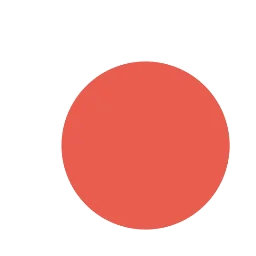

- Source
- 4,188 B
- SVG
- 2,936 B
- Paths
- 22
Measured: · Settings: Color / Original
Compare with a deliberately redrawn circle
Tracing versus authoring
The authored alternative is an intentionally simplified redraw. It removes the pale fringe and small color variations; it is not the original design recovered by SVGKIT.

- Traced paths
- 22
- Redrawn circles
- 1
| Published file | Raw bytes | Representation | What the number does not prove |
|---|---|---|---|
| Original WebP | 4,188 | 256 x 256 pixels | That the export is optimally compressed |
| Saved SVGKIT trace | 2,936 | 22 paths | That the contour matches approved source artwork |
| Authored SVG | 143 | 1 circle, 0 paths | That removing the fringe is an acceptable design change |
The trace saves 1,252 bytes, about 29.9%, against this particular WebP. The 143-byte redraw is much smaller because it describes a different, simpler appearance. It would be misleading to call that a lossless compression result. These are raw file sizes, not compressed transfer sizes or rendering-time measurements.
The authored file contains this complete geometry. Its byte count includes a trailing newline. The center, radius, and fill are chosen for this demonstration, not recovered design parameters.
<svg xmlns="http://www.w3.org/2000/svg" width="256" height="256" viewBox="0 0 256 256"><circle cx="144" cy="144" r="85" fill="#e74c3c"/></svg>Inspect the authored SVG and measurement record with file hashes. The browser version and reproduction command are recorded there. The circle element documentation explains its geometric parameters.
Common mistakes
Counting every smaller file as an improvement
A smaller redraw can still be the wrong brand asset. Require visual approval before replacing a textured, outlined, or subtly shaded mark with flat geometry.
Using PNG as a repair step
A WebP-to-PNG export can help a tool accept an input, but it does not undo lossy compression or recover vector layers. Use the clean source export when available.
Assuming zero paths means an empty SVG
The authored sample has no path elements because it uses a circle. Count the actual graphic elements; path count alone is not a quality score.
Best practices
- Keep the original WebP and record its intended display dimensions.
- Compare a trace at both the actual display size and an enlarged size.
- Check transparent edges on two background colors before deciding.
- Separate faithful recovery from a design simplification in review notes.
- Record the chosen file and the reason for replacement, not just a savings percentage.
Practical workflow
- 1State the missing capability: larger display, geometric editing, or a measured delivery saving.
- 2Inspect export properties and ask for original vector artwork.
- 3Keep the WebP as the baseline and trace only if recovery is needed.
- 4If the geometry is known, compare a separately authored alternative.
- 5Review appearance, structure, and raw file size for each candidate.
- 6Ship the acceptable representation and retain the source for future changes.
FAQ
Can a lossless WebP recover the original SVG?
No. Lossless refers to encoded pixels. Layer names, circle radii, and editable design objects are not reconstructed simply because those pixels were stored losslessly.
Should I replace a 24-pixel WebP icon that already looks correct?
Only if a concrete requirement is unmet. A fixed-size icon with acceptable delivery cost does not need reconstruction just to acquire an SVG extension.
Can I apply the 143-byte result to any circular logo?
No. This sample discards source details intentionally. A border, shadow, texture, or brand-specific contour may need additional geometry and explicit approval.
Need to recover a WebP outline?
Compare the downloaded trace with your existing asset. Keep the WebP if the replacement does not meet your visual or editing requirement.
Try Image to SVG